VBA编程技巧与应用攻略

Visual Basic for Applications (VBA) is a powerful programming language and integrated development environment (IDE) that is built into Microsoft Office applications such as Excel, Word, Access, and PowerPoint. It allows users to automate tasks, manipulate data, and create custom solutions within these applications. Here are some basic concepts and examples to get you started with VBA:
### Getting Started
1. "Open the VBA Editor:"
- In Excel, press `ALT + F11` to open the VBA editor.
- In Word, go to `Developer` tab and click on `Visual Basic`.
2. "Insert a Module:"
- In the VBA editor, right-click on any of the items in the "Project" window.
- Go to `Insert` > `Module` to create a new module.
### Basic Syntax
VBA has a straightforward syntax that is similar to other programming languages. Here is a simple example of a VBA subroutine that prints "Hello, World!" to the immediate window:
```vba
Sub HelloWorld()
MsgBox "Hello, World!"
End Sub
```
### Example: Automate Excel Tasks
Here is an example of a VBA macro that automates the process of creating a new workbook, adding some data, and saving the workbook.
```vba
Sub CreateNewWorkbook()
' Create a new workbook
Dim newWorkbook As Workbook
Set newWorkbook = Workbooks.Add
'
相关内容:
图像框Image—它是窗体重要的控件之一,我们都喜欢在窗体中展示一些照片;除了展示一些人员照片、零件图片,这些比较常用的用途外。可能大家还想展示一些报告资料、公司简介等;如果不想依赖第三方软件打开:如 网页、PDF阅读器,那就只能使用图片样式了,如果资料很多,转换为图片后很长(如下图),要在IMAGE控件空间内完全显示就会很小,那怎么办?能不能通过滑动屏幕来显示整份资料???
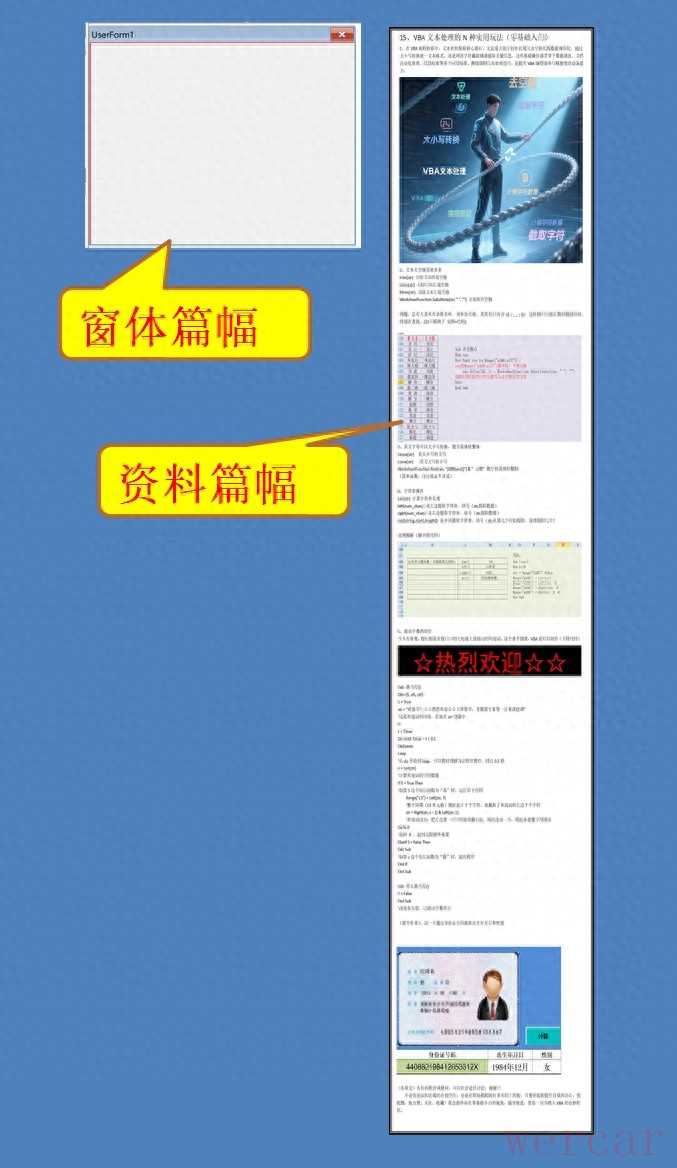
本来想插入一个GIF来展示效果,真没时间研究了~~抱歉抱歉
说具体步骤吧:
1、在窗体中插入image 图像控件
2、编写代码
Dim Dx As Single, Dy As Single 'MouseDown 时鼠标位置
Dim Dl As Single, Dt As Single 'MouseDown 时控件位置位置
在窗体代码最上端写两个位置的公共变量
Private Sub UserForm_Initialize()
'窗体初始化
UserForm1.Image1.AutoSize = True
'先将image控件大小设置为自适应图片
UserForm1.Image1.PictureSizeMode = fmPictureSizeModeStretch
‘设置图片的显示方式
Dim pp$
pp = ThisWorkbook.Path & "picture 4.jpg"
UserForm1.Image1.Picture = LoadPicture(pp)
‘图片空间导入指定图片
Dim pw, ph
pw = UserForm1.Image1.Width
ph = UserForm1.Image1.Height
‘取得图片空间的宽和高,其实就是照片的大小
UserForm1.Image1.AutoSize = False '这里要取消自由尺寸,才能进行设置
UserForm1.Image1.Width = 420
' 设置控件的宽度,这个数是窗体的宽度
UserForm1.Image1.Height = ph / (pw / 420)
'将image的宽度设为420,再将长度按比例设置
UserForm1.Image1.Top = 0 '顶部对齐窗体上端
End Sub
以下是按下鼠标事件,触摸屏可以理解为手指触摸时;
Private Sub Image1_MouseDown(ByVal Button As Integer, ByVal Shift As Integer, ByVal X As Single, ByVal Y As Single)
Dy = Y
Dt = Image1.Top
End Sub
以下是移动鼠标事件
Private Sub image1_MouseMove(ByVal Button As Integer, ByVal Shift As Integer, ByVal X As Single, ByVal Y As Single)
If Button = 1 Then’1代表鼠标按下左键
Call Image1_MouseDown(1, 0, Dx, Dy)
Image1.Move 0, Dt - (Dy - Y)
'Image1.Move Dl - (Dx - X), Dt - (Dy - Y)
End If
End Sub
以上两段代码,通过鼠标按下、鼠标拖动 事件,不断捕捉鼠标位置,来控制image控件位置变化。
你学会了吗?不论你是求知若渴的在校学生,还是在职场摸爬滚打多年的上班族,只要怀揣着提升自我的决心,别犹豫,快点赞、关注、收藏!我会始终站在零基础小白的视角,循序渐进,带你一步步踏入VBA的奇妙世界。